


מדריך המשתמש
אווירה

האטמוספירה היא הבסיס הסביבתי — הפד המתמשך ותואם המקום שיושב מתחת לרגע ומהווה שתיקה משכנעת. בחר בסאונד, הפעל אותו, והוא יתפוח פנימה ויחזיק עד שתשחרר אותו. התנגן מקשים או גיטרה מעל לכך לרגעים הרהורים בהופעה שלך, או פשוט כדי להוסיף מרקם לכל שיר.
הפעל
דוושת האטמוספירה טוען אוטומטית את המקום של השיר הנוכחי שלך, כך שאין 猜测. פשוט הקש על כפתור הפעל כדי להדליק עקומה סביבתית שממלאה אינסוף בסאונד. שינויים שתבצע לגבי מקום, טונליות או טלאי מקופחים עד שתלחץ על הפעל.
הפסק
תוכל בקלות להפסיק את העקומה הסביבתית על ידי לחיצה על כפתור הפסק. מתלה האטמוספירה ממשיך לנגן גם כשאתה משנה שירים.
טלאי
כפתור זה משמש להחלפה בין חמשת טלאי הטלאים. אתה מקבל את חמשת טלאי האטמוספירה הפופולריים המיוצרים על ידי Aerospace Audio: Exosphere, Thermosphere, Mesosphere, Stratosphere, Troposphere. אתה יכול גם לשנות את הטלאי על ידי הקשה על כפתור ה-LED במסלול.
טונליות
כפתור הטונליות בצד שמאל משתנה בין שלוש הטונליות או מצבי המקום: מז'ור, מינור או ניטרלי. זה נעשה אוטומטית אם הדוושה עוקבת אחר השיר.
מקום
המקום עוקב אוטומטית אחר השיר כברירת מחדל. אתה יכול גם לשנות את המקום על ידי הקשה על טקסט המקום כדי לפתוח תפריט, או על ידי שימוש בכפתורי + ו-- בצד ימין. כאשר אתה משנה את המקום ידנית, אות המקום במעגל יפעם כאשר הוא מוכן להפעלה.
הורדות
קולות הטלאים מורדים באופן דינמי כאשר מתבקשים. אם תשנה את המקום, הטונליות או הטלאי, תבחין שהמעגל באמצע כולל הנפשת טעינה אם העקומה לא הורדה בעבר. לאחר השלמה, האלמנט ששינית יפעם כדי להצביע שתוכל להפעיל אותו על ידי הקשה על כפתור הפעל.
תפריט
תוכל להגדיר את דוושת האטמוספירה עוד יותר על ידי הקשה על כפתור התפריט בצד ימין. זה פותח תפריט עם האפשרויות הבאות:
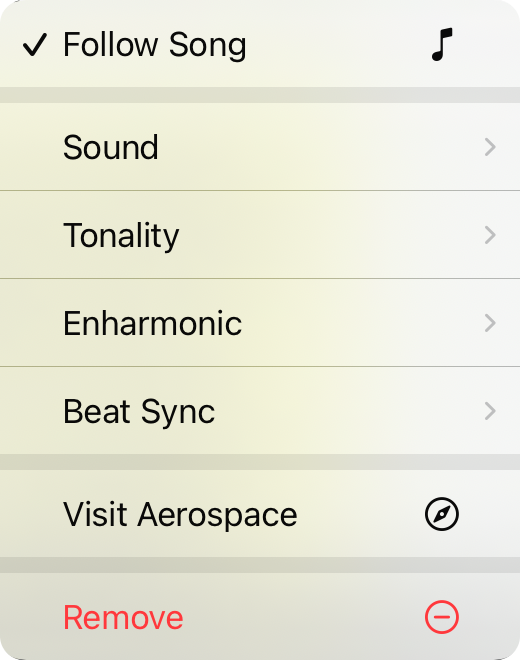
עקוב אחר שיר
כאשר זה מסומן, המקום של השיר מנהל את המקום של נגן האטמוספירה. הוא יחליט בין מז'ור או מינור אלא אם בחרת ניטרלי, ובמקרה זה הטונליות תישאר ניטרלית. ברירת המחדל היא פעיל.
טלאי
משמש לשינוי הטלאי המשמש לשינוי הסאונדים הסביבתיים.
טונליות
משמש לשינוי הטונליות בין מז'ור, מינור וניטרלי.
אנהרמוני
קובע אם התו המוצג הוא חד או שטוח. ברירת המחדל היא אוטומטי, המשתמש בהעדפת האנהרמוני של השיר, אך אתה יכול לכפות אותה בדרך אחת או אחרת.
סנכרון קצב
אופציונלי יישר את המעברים הכלואים כאשר אתה מפעיל לסרגל או קצב. כברירת מחדל זה כבוי.
בקר ב-Aerospace
לוקח אותך אל אתר Aerospace Audio
הסר
מסיר את הלוח מהכרטיסייה.


