


Manual de utilizare
Document

Fila document vă permite să schimbați setările documentului pentru fiecare cântec, cum ar fi modul de iluminare scăzută, culoarea nuanței, fontul, dimensiunea hârtiei și marginile.
Setări
Puteți atinge pictograma cheii ingleze din colțul superior stâng pentru a schimba setările globale ale sistemului pentru modul în care se comportă acest meniu. Aceasta nu afectează formatarea per cântec.
Modul de nuanță
Modul determină culorile utilizate pentru a afișa cântecul pe ecran și poate fi folosit pentru a ajuta la vizibilitatea ecranului în diferite medii sau pentru utilizatorii cu tulburări de stres vizual. Modurile se schimbă în consecință pentru Modul de iluminare scăzută. Dacă nicio opțiune nu este selectată, OnSong va afișa cântecul folosind setările implicite. Opțiunile includ:
- Hârtie afișează cântecul în alb și negru cu contrast ridicat.
- Atenuat afișează similar cu hârtia, dar cu contrast mai scăzut.
- Sepia afișează similar cu atenuat, dar cu tonuri de culoare mai calde.
- Cer afișează cântecul prin suprapunerea unei nuanțe albastre pentru a ajuta la tulburările de stres vizual.
Modul de iluminare scăzută
La dreapta butoanelor de mod se află o pictogramă pe care o puteți utiliza pentru a activa/dezactiva modul de iluminare scăzută. Aceasta este setată la nivel de sistem atunci când este comutată și veți observa că aceasta aplică acele modificări și modului pe care l-am selectat. Aceasta afectează toate cântecele și meniurile din OnSong.
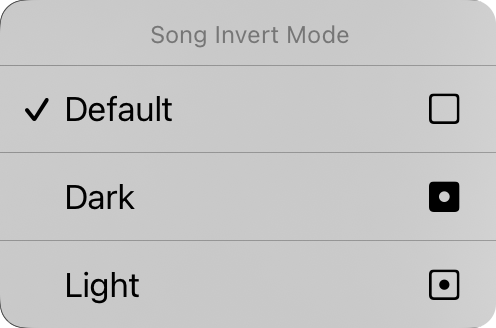
De asemenea, puteți atinge și ține apăsat pe butonul de iluminare scăzută pentru a afișa meniul contextual Song Invert Mode. De aici puteți schimba modul de iluminare scăzută pentru documentul specific. Aceasta este setată la „implicit" implicit, ceea ce înseamnă că documentul cântecului va participa la modul de iluminare scăzută pe măsură ce se schimbă în sistem. Puteți forța documentul cântecului să fie vizualizat în modul închis sau deschis aici, independent de modul de iluminare scăzută setat pentru aplicație.
Familia de fonturi
Cinci butoane în partea de sus a meniului vă permit să alegeti fontul întregului cântec. Puteți alege dintre:
- Sans-Serif este un font ca Helvetica care este perfect pentru afișarea diagramelor de acorduri. Implicit.
- Serif este un font ca Georgia care poate fi mai ușor de citit pentru unii utilizatori.
- Scris de mână este un font ca Marker care este foarte îngust, permițând mai mult conținut pe pagină.
- Monospațiat este un font cu lățime fixă ca Courier care este util în unele cazuri pentru alinierea acordurilor.
- Personalizat afișează trei puncte unde puteți răsfoi fonturile instalate pe dispozitivul dvs. și puteți alege una. De fiecare dată când selectați această opțiune, ecranul Font personalizat va reapărea pentru selectare.
Spațierea liniilor
Atunci când doriți să încărcați mai mult pe ecran, luați în considerare reducerea spațierii liniilor sau a spațiului dintre linii. Puteți, de asemenea, să măriți spațierea liniilor pentru mai mult spațiu între linii pentru o mai bună vizibilitate. Puteți atinge pictogramele din stânga și dreapta tuturor glisoarelor pentru a regleza cu precizie fiecare valoare. Se ajustează între 0,7 și 1,3 linii. Implicit este 1,0.
Hârtie
Aceasta vă permite să setați dimensiunea paginii virtuale, care afectează dimensiunea fonturilor pe care le selectați. De exemplu, dimensiunile mai mari de hârtie vor afișa fonturile într-o dimensiune mai mică. Pictogramele din dreapta vă permit să alegeți între orientarea portret și peisaj.
Aspect
Secțiunea de aspect vă permite să definiți modul în care fiecare pagină a documentului este scoasă la iveală atunci când utilizați Motorul de redare R2. Aceasta are trei controale:
Paginare
Aceasta vă permite să alegeți să desfaceți diagrama pe pagină cu o foaie de derulare continuă sau să împărțiți pagina în foi virtuale de hârtie.
Coloane
Acest control vă permite să alegeți între una și două coloane. Când sunt activate două coloane, secțiunile cântecului dvs. se vor desfășura în cealaltă jumătate a foii.
Gutter
Aceasta este lățimea gutter-ului, spațiul dintre coloane. Opțiunile includ 0" la 1" în incremente de 1/16".
Margini
Marginile vă permit să adăugați o inset pe marginile hârtiei virtuale de pe ecran. Aceasta este utilă pentru a face textul vizibil și pentru a furniza spațiu pentru Colțuri fierbinți sau Zone de navigare atunci când se utilizează și selecția secțiunilor. Pictograma din dreapta arată când marja este schimbată: stânga, dreapta, sus sau jos.
Subsol
Aceasta vă permite să setați dimensiunea subsolfondului ca procent din dimensiunea fontului liricilor. Puteți, de asemenea, să utilizați butonul din dreapta pentru a activa/dezactiva subsolul.
Toate controalele de pe această filă, cu excepția modului de iluminare scăzută, se aplică cântecului selectat. Vom vedea cum să aplicăm schimbările la cântece diferite din biblioteca noastră în curând.
Puteți schimba valorile implicite ale fiecărui aspect al documentului atingând pictograma cheii engleze din colțul superior stâng pentru a accesa opțiunile Document de preferințe de stil.


