


Read The Bleepin’ Manual
Vibes (Literally Just the Vibe™)

Atmosphere is that chill, drony, key-matched pad that lurks under your moment & makes silence feel like it was totally intentional. Pick a sound, hit it, & it swells up & holds til you're like "okay bye." Shred keys or guitar on top for those ~vibes~ moments, or just throw it on literally any song to sound like you know what you're doin'.
Engage
The Atmosphere pedal is like a mind reader — it auto-loads your song's key so you don't have to think (bless). Just tap Engage to fade in an ambient track that goes on forever & ever. Any key, tonality, or patch changes you make are just chillin' in the staging area til you hit Engage for real.
Abort
Wanna kill the ambient vibe? Smash the Abort button. (The Atmosphere keeps goin' even when you ditch to another song, so... heads up.)
Patch
This button lets you flip between five patch presets. You get the five fire Atmosphere patches from Aerospace Audio: Exosphere, Thermosphere, Mesosphere, Stratosphere, Troposphere. Or just tap the LED button in orbit if you're feeling fancy.
Tonality
The tonality button on the left toggles between three tonalities (or whatever): major, minor, or neutral. It does this automatically if the pedal's stalkin' your song.
Key
The key follows your song by default (no effort required, you're welcome). Wanna change it? Tap the key text to open a menu, or smash the + & - buttons on the right. When you manually yeet the key, the letter in the circle will pulse when it's ready to engage.
Downloads
The patch sounds download on-demand, because apparently we can't bundle everything. Change the key, tonality, or patch & you'll see a lil' loading animation in the circle if we haven't grabbed that track yet. Once it's done, the thing you changed will pulse to tell you "yo, tap Engage now."
Menu
Wanna nerd out on settings? Tap the menu button on the right to unlock a whole menu of options:
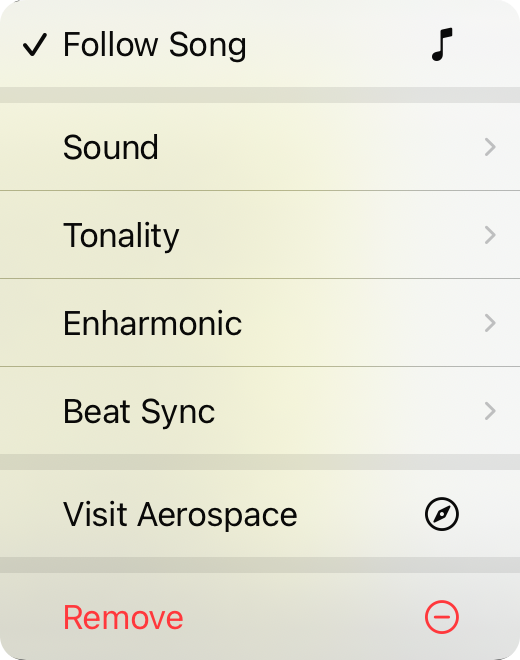
Follow Song
Checked = the song's key controls the ambient player's key. It'll pick major or minor unless you go neutral, then it stays neutral. On by default (because we're helpful like that).
Patch
Switch up which patch is makin' the ambient sounds.
Tonality
Toggle between major, minor & neutral.
Enharmonic
Does the note show as sharp or flat? Automatic uses the song's preference, but you can force it if you're feelin' stubborn.
Beat Sync
Optionally snaps your crossfades to the bar or beat when you engage. Off by default (we're chill).
Visit Aerospace
Takes you to the Aerospace Audio Website (go say hi).
Remove
Yeet this panel off the tab.


