


Felhasználói kézikönyv
Dalok hozzáadása
Sokféleképpen importálhat dalokat a OnSong könyvtárba. Válasszon az alábbi elérhető lehetőségek közül:
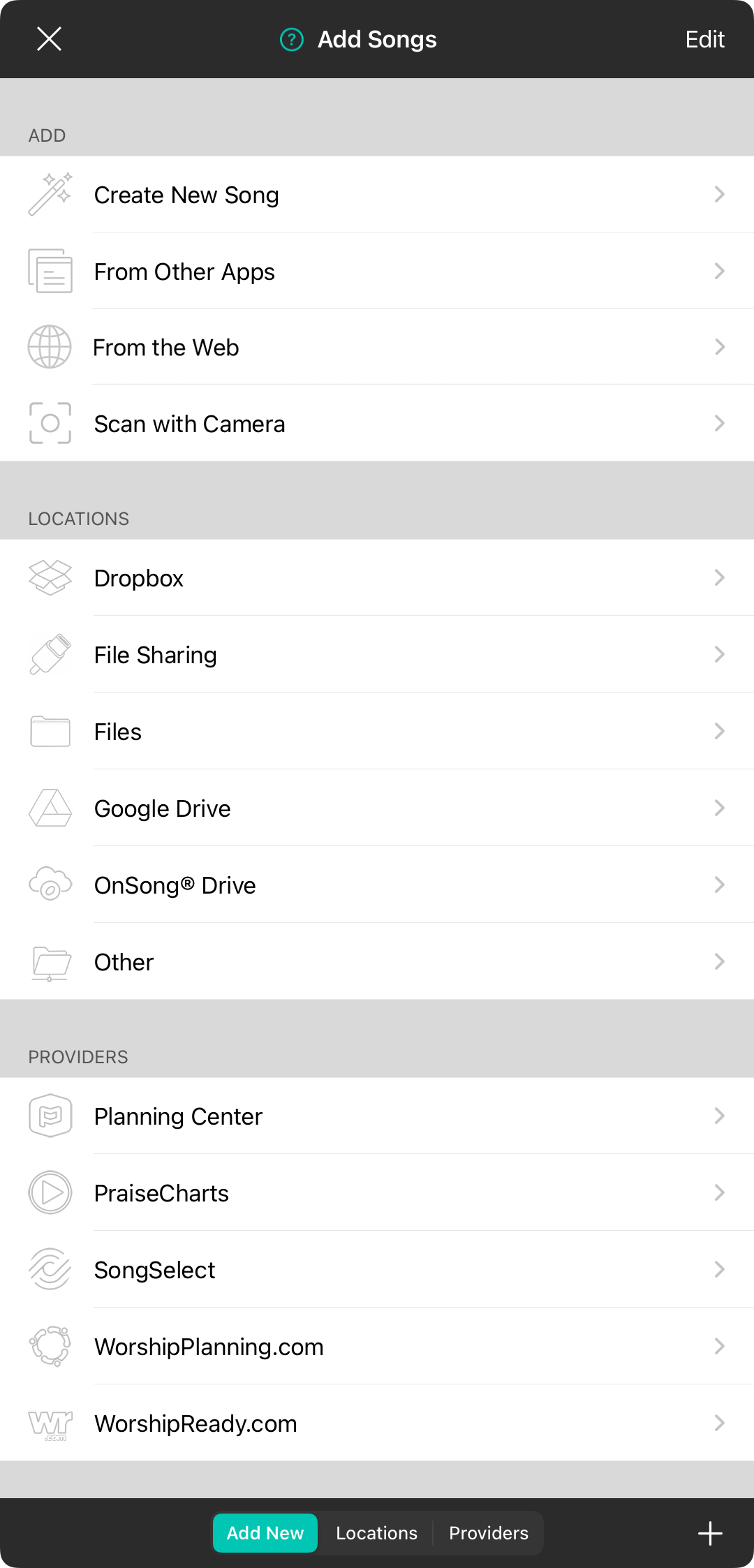
Hozzáadás
Ez a szakasz lehetővé teszi, hogy dalokat hozzon létre a OnSong alkalmazásban, vagy meglévő dalokat adjon hozzá egy könyvhöz.
- Új dal létrehozása megnyitja a Sablonválasztót, amellyel kiválaszthatja a dal létrehozásának kiindulópontját. Ha nincsenek elérhető sablonok, a OnSong megnyitja a Dalszerkesztőt egy üres dallal. Írja meg a dalát, és koppintson a Kész gombra az újonnan írott dal könyvtárhoz való hozzáadásához.
- Meglévő dalok (nem jelenik meg) megnyitja a Dalok kiválasztása menüt, amely lehetővé teszi a kiválasztott könyvhöz hozzáadandó dalok kiválasztását. Ez csak akkor jelenik meg, ha a fiók egy könyvet választott ki.
- Más alkalmazásokból információt nyújt az Add to OnSong kiterjesztésről, amely lehetővé teszi, hogy sokféle alkalmazásból importáljon tartalmat a OnSong könyvtárba.
- Az internetről megnyitja az alkalmazáson belüli böngészőt, amely lehetővé teszi, hogy kedvenc webhelyeiről importáljon tartalmat.
- Szkennelés kamerával lehetővé teszi, hogy eszközének kamerájával papírból készült diagramokat szkenneljen közvetlenül a könyvtárba.
Helyek
Ez a szakasz azokat a tárolási szolgáltatások helyeit jeleníti meg, ahol fájlokat menthet az importáláshoz.
- Dropbox egy népszerű felhőalapú tárolási szolgáltatás, amely kiválóan működik a dokumentumok számítógépéről történő importálásához.
- Fájlmegosztás lehetővé teszi, hogy fájlokat importáljon a számítógépéről USB-kábellel és az iTunes szoftver (Windows) vagy a Finder (macOS) segítségével. A fájlmegosztás nem érhető el, ha a OnSong Mac gépről fut, de manuálisan hozzáadhat dokumentumokat vagy letöltéseket az alul található + gomb segítségével.
- Fájlok lehetővé teszi, hogy az iOS-hez szorosan integrált tárolási szolgáltatásokból importáljon fájlokat, például a Fájlok alkalmazásban található fájlokat.
- Google Drive egy népszerű felhőalapú tárolási szolgáltatás, amely támogatja az online dokumentumok szerkesztését is.
- OnSong® Drive lehetőséget biztosít személyes vagy megosztott fájlok átvitelére a OnSong® fiók segítségével.
- Egyéb lehetővé teszi, hogy más távoli forrásokból importáljon az olyan szabványos kommunikációs protokollok segítségével, mint a WebDAV, FTP, vagy az Amazon S3-ból.
Szolgáltatók
Különféle tartalomszolgáltatókkal dolgozunk együtt, hogy könnyen importálhassa tartalmát a OnSong alkalmazásba. Ezekhez külön előfizetésre van szükség a hozzáféréshez.
- OnSong® Diagramok kézzel elkészített diagramokat tartalmaz, amelyek kiválóan működnek a OnSong® alkalmazásban.
- Planning Center egy népszerű egyházi kezelési szolgáltatás, amely lehetővé teszi a zene szervezését a csapatához.
- PraiseCharts hozzáférést biztosít a PraiseCharts könyvtárához akkorddiagramokkal, kottákkal, háttérsávokkal és még sok mással.
- SongSelect a CCLI-tól származó szolgáltatás, amely PDF-alapú és szövegalapú akkorddiagramokat és dalszövegeket nyújt.
- WorshipPlanning.com könnyűvé teszi az istentiszteleti szolgálatok megtervezését. Könnyen importálhatja eseményeit, dalait és háttérsávjait a OnSong alkalmazásba.
- WorshipReady.com kézzel elkészített istentiszteleti akkorddiagramokat készít a OnSong fájlformátumban. Ezek különféle előfizetési szinteken keresztül érhetők el az egyes hónapokban szükséges akkorddiagramok számától függően.
- LTC Asaph (nem jelenik meg) az istentiszteleti akkorddiagramok szolgáltatója a franciául beszélő gyülekezetek számára.
Szerkesztési mód
Az importálási helyek és szolgáltatók listáját módosíthatja, ha a jobb felső sarokban lévő Szerkesztés gombra koppint.
Helyi menü
Az importálási forrásra koppintva és tartva (iOS/iPadOS) vagy jobb gombbal kattintva (macOS) megjelenik egy helyi menü az további műveletek végrehajtásához.
 Eltávolítás eltávolítja az importálási forrást a listáról. Ez újra hozzáadható a jobb alsó sarokban lévő + segítségével. Csak az importálási források távolíthatók el.
- Átnevezés lehetővé teszi az importálási forrás nevének módosítását.


